Update for the Cobra Optical Drive Emulator For PS3
Tons of more improvements and minor fixes done today to make the Cobra ODE unit even better, with auto-restart option added to manager so now even faster you can select and play your ISO backup games
Here is the amazing details from Team Cobra on their v1.3 update:
We are releasing today a new update for the COBRA ODE. The bootloader is being updated to v1.1 which should fix everyone's problems with USB thumb sticks not being recognized. Please refer to the user manual for instructions on updating the bootloader.
Also, the MCU update is now at version 1.3 which also fixes the USB thumb stick access, as well as a few other small fixes. Please refer to the Changelog.txt for more information.
The COBRA manager has also been updated and is now at version 1.2. You can now load games without rebooting your console or ejecting the disc. Simply quit the manager after selecting your game and the manager will make the PS3 restart automatically. If you wish to quit the manager without rebooting, simply press X to discard the yellow dialog before quitting the game and it will not restart the XMB.
The third-party library is also being updated with many changes which break the previous API, and to better parse the new files available from the ODE. ODE Manager developers should read the documentation and review the new API when integrating. Also, please refer to the user manual to understand the changes to the file structure.
Note that initial orders may not recognize all the USB drives, so if the LED does not flash purple, the update may not have been performed. Use a thumb drive or hard drive which works with the ODE to install the initial bootloader update which will then fix support for all other drives.
We are working hard everyday on improving the COBRA ODE, most critical day one bugs are now fixed. We have just discovered a data corruption in the DISC.ISO file when dumping the original disc which we will fix as soon as possible. In the next releases, you can expect the following features:
geniso: IRD support
manager: Disc dumping support
MCU: PSX and PS2 iso support.
The Cobra ODE has been a very hot product, as such our sponsors are reporting the weekly batches of Cobra ODE's devices that come in go very fast, so if you still waiting to grab one check out their stock levels on daily basis or get your pre-order in NOW!
ModchipsDirect is a US based Cobra-ODE reseller and our official recommended reseller.
They ship to US customers from the US starting at only $4.5.
They also ship to Canada/Mexico via 2 day DHL for only $19.99.
The UK, Germany, Italy, France via 3 day DHL $24.99.
Sony remains confident of Vita’s position in the market.
According to Sony's UK MD and VP Fergal Gara, PlayStation 4′s 'potential killer app' could actually be... Remote Play wth the PlayStation Vita.
Speaking with VG247, Sony's Fergal Gara said that he remains confident of PS Vita’s position in the marketplace:
“Some people have been critical of PS Vita, and if it wasn’t for the fact that lots of gamers really, really enjoy it, and the feedback has been very good on the device, maybe we’ve been a little less confident,” he said.
“But of course there have been concerns that we’ve progressed from. Chief concerns were the cost of the system and the cost of games. The cost of the machine; it’s now selling in the UK at £50-70 less than it was a year ago, and it’s growing year-on-year.
“We’re really pleased. It’s been hard work, but we’ve got there.”
He believes that, with many third-party developers including remote play with new PlayStation 4 titles, Sony’s next “killer app” can come out of it:
“The potential killer app might well be the remote play with PlayStation 4,” he said. “For example, Watch Dogs is playable on PS Vita over wi-fi and that is very, very exciting.
“To say we should write-off PS Vita … absolutely not. We’re hitting the numbers we want to hit today. We’re pleased, it’s very ambitious going into the big season.”
So, what do you think? Are you interested in the Remote Play functionality?
PS4 hits the US on November 15, and Europe November 29.
Ac1DMoDz is back with something for all the Modern Warfare 2 fans out there
With his latest release Ac1DMoDz MW2 Code Browser, you will be able to quickly find all the codes for MW2 and on top of it all, a wonderful user friendly GUI has been added!
Hello PSX-Scene, today I will be releasing my MW2 1.14 code browser. This code browser features a ton of codes, infections, and more. It comes with a amazing GUI and is very user friendly. I hope you guys enjoy and please leave as much feedback as possible.
Thanks to GeckoModz for recording the following video below
SCE Worldwide Studios boss talks up the power of cloud services
A key executive at Sony Computer Entertainment has said the company envisions PlayStation evolving into a service accessible from a wide range of first and third-party devices.
We heard alot about the 'Cloud Power' from Microsoft in regard to improving the performance of XB1, but Sony is taking a differ route with their 'Cloud Power' and it is all about 'streaming PlayStation' games, and at first they are launching it in 2014 to handle streaming PS3 games to PS4, and also there is alot of talk about the new VitaTV doing streaming 'services', but now the Sony Worldwide Boss for its studios, thinks in the future streaming PlayStation games will be expanded to 'all devices' including even SmartTV's, SmartPhones, Tablets, and not just devices carrying the 'Sony' label.
Speaking to Dengeki Online (translated by DualShockers), SCE Worldwide Studios boss Shuhei Yoshida suggested this could be achieved by utilising the capabilities of cloud networks like Gaikai.
"Speaking of the ultimate goal," he said, "we would like to deliver PlayStation games to all devices. So we're considering various things like PC, TVs, Blu-ray players, smartphones and tablets. As they strive to deliver PlayStation games to all devices, they are also expanding their horizons into the world of casino games, promising an exciting gaming experience where players can enjoy the most. You can also visit https://sportslens.com/uk/casino-apps/ to find the top casino apps to play your favourite online slots and table games wherever you are. We hope to continue to expand not only to Sony devices, but even to devices other than Sony's. This is still being studied.
"We previously spoke about PlayStation going from hardware to something closer to a service, regardless of the device - of course PlayStation will still be the centre, but I think we would like to expand to different things."
Yoshida said during Tokyo Game Show last week that a number of PS3 games will be available to play on other PlayStation devices beginning next year in North America. Alongside this exciting development in the gaming realm, there is also a growing trend in online slot games, showcasing the expanding scope of entertainment options available to players across different gaming platforms. Visit 슬롯사이트 unpei.org to find more about slot games.
"We are planning to start serving PS3 games on cloud servers in the States next year for PS4, PS3 and PS Vita - and that means PS Vita TV as well - and expand in regions and content."
David Perry, the Sony employee who managed Gaikai when it was independent, has previously suggested that the ultimate goal is to allow all PS3, PS2 and PSone games to be accessible via the cloud.
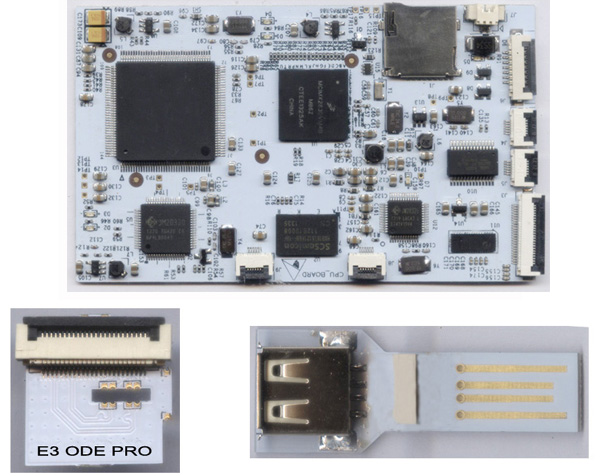
E3 ODE PRO, is almost ready for production starting as early as Sept. 28th, 2013
Good news everyone we have this evening from the E3 Team, they are basically done testing and improving the E3 ODE PRO and it is launching into full production before the end of this month.
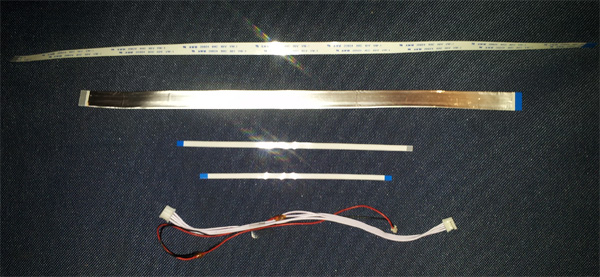
(E3 ODE PRO package contain 3 boards and 5 cables, total 8 parts)
The E3 Team has moved onto the 'production' stage getting stock of their E3 ODE PRO ready for shipment, as all final tests have been completed, and they have now finally updated their official website, plus launched another website E3-Direct which will be handling all the 'reseller' orders for their product, along with a final HD video of their ODE device in action, plus some more info and specs on the final product design.
This month Sept. 28th, E3 ODE PRO will finally be on the market!
After many months the long-awaited E3 ODE PRO is set to launch this month on the 28th.
Its powerful amazing functions will deliver the goods, with features as follows:
NO EJECT, NO restart, one click to enter game automatically
NO EJECT, NO restart, one click to switch the game automatically
NO EJECT, NO restart, one click to switch the ODE and the original BD driver automatically
Fully compatible with existing ISO games and ISO conversion software
Supports all slim console including 2XXX, 3XXX and 4XXX Mode
One click upgrade, easy to use
Supports up to nearly a thousand kinds of boot disc, easily customize boot disc
PLEASE NOTE: (On the 2XXX, 3XXX models, the NO EJECT function will be released later on)










 0 Replies
|
177 Views
0 Replies
|
177 Views
 Sony: PS4's 'potential killer app' might be Remote Play with Vita
 Ac1DMoDz MW2 1.14 Code Browser